A Linktree Alternative for Community Invites: Why Link-in-Bio Isn't Enough
Linktree and other link-in-bio tools are built to publish links. A community invite needs the opposite: a link that decides who gets through. An honest comparison, including what Linktree's own locks do and where Linktree is still the better choice.
Two Pages That Look the Same
A Linktree page and a ShieldmyLinks bio page look almost identical: an avatar, a title, a stack of buttons. The similarity ends there.
A link-in-bio tool is built to publish. Its job is to get as many people as possible to as many destinations as possible, with as little in the way as possible. For a shop, a podcast, a newsletter or a portfolio, that is exactly right, and Linktree does it very well.
A community invite needs the opposite. The destination is a door: a WhatsApp group, a Discord server, a Telegram channel. What is behind it is only worth something if you have a say in who comes through.
We Looked at the Source of a Real Community's Linktree
We took the public Linktree page of a real community that runs many WhatsApp groups and fetched it the way a scraper does: one plain HTTP request, no browser, no JavaScript, no clicks.
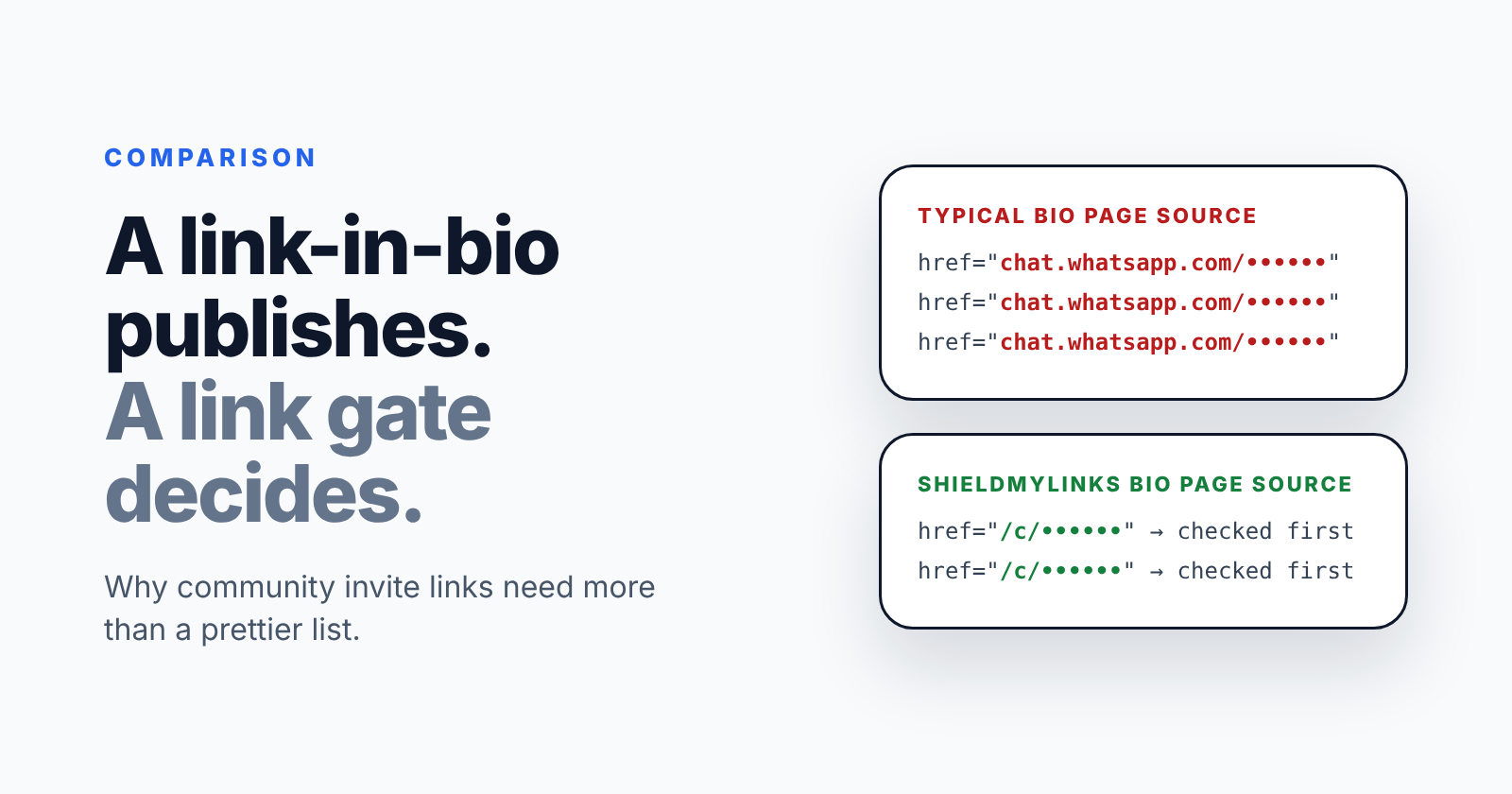
The HTML that came back contained 21 raw chat.whatsapp.com invite links. No captcha, no wait, nothing to solve. Anyone who can download a web page can collect every one of them in under a second, and the link-harvesting pipelines that feed WhatsApp spam do exactly that.
This is not a Linktree bug. Publishing the URL is what the page is for. But for an invite link, publishing is the leak.
You can check your own page in thirty seconds:
- Open your bio page on a computer
- View the page source (Ctrl+U on Windows, Cmd+Option+U on a Mac)
- Search for
chat.whatsapp.com,discord.ggandt.me/
Every hit is an invite a script can take without ever loading your page in a browser.
On a ShieldmyLinks bio page, every button points to a protected address of the form /c/{code}. The real destination is not in the page and cannot be read with the public API key. It is released by our server, once, after that link's checks pass.
"But Linktree Has Locks"
It does, and a fair comparison has to include them. According to Linktree's own help centre:
- Code Lock asks visitors for a code before the link opens. The code must be 4 digits, numbers only, and it is available on the Pro and Premium plans.
- Age Lock asks visitors for their date of birth and blocks anyone under the minimum age you set.
- Sensitive content labels show an acknowledgement screen (18+, 21+, 25+, or a general warning) before the link.
- Profile Lock puts a lock screen in front of the whole page. It is in beta and not available to every account yet.
- Link scheduling is listed from the Starter plan up.
These solve real problems. Age Lock and the sensitive-content screens are the right tool for an alcohol brand or an adult creator, and ShieldmyLinks has no equivalent. A code is a reasonable speed bump for a casual private link.
What they are not is a defence against automation. None of them is a human-verification step, and a 4-digit code has 10,000 possible values. We found no country rule and no limit on the number of visitors in Linktree's help centre. And scheduling controls when a button appears on your page; it can do nothing about an invite URL that has already been copied, because that URL belongs to WhatsApp, not to Linktree.
Side by Side
| Linktree | ShieldmyLinks | |
|---|---|---|
| Invite URL in the page HTML | Yes, for ordinary links (confirmed in our test) | No: released by the server after checks |
| Human verification | Not offered | reCAPTCHA v2 or v3, per link |
| Passcode | Code Lock: 4 digits, numbers only (Pro and Premium) | Any password, stored hashed, checked on the server together with the captcha |
| Age confirmation | Age Lock and sensitive-content screens | Not offered |
| Country rules | None found | Allow or block lists, per link |
| Time window | Link scheduling (paid plans) | Opens-at and closes-at, with a countdown; destination sealed until it opens |
| Visit cap | None found | Closes itself after a set number of verified visits |
| Analytics | Clicks and traffic sources | Verified humans and blocked attempts counted separately, plus country, device, referrer |
| QR code | For your profile page | For every link and every bio page |
| Free plan | Unlimited links | 3 protected links, 1 bio page |
| Paid plan | Pro from $12/month billed annually, $15 monthly (published 2026 pricing; Linktree notes prices vary by region) | $99/year, or CHF 99 in Switzerland |
| Commerce, integrations, templates | Extensive | Minimal |
Where Linktree Is the Better Choice
We would rather you pick the right tool than the wrong one from us.
- You sell things. Linktree's commerce features, store integrations and email capture are years ahead, and ShieldmyLinks does not try to compete there.
- Design matters most. Linktree has far more templates and layout control.
- You need lots of links for free. Linktree's free plan has unlimited links; ours has three.
- You need an age gate. Age Lock does a job we do not do.
- Every link on your page is meant to be public anyway. If there is no door, you do not need a lock.
Where ShieldmyLinks Fits Better
- Your links are invites. WhatsApp, Discord, Telegram, Slack, a private event form: anything where the wrong visitors damage what is behind it.
- You have been hit by bots before. Human verification stops automated joins before they receive the invite, rather than leaving you to clean up afterwards.
- Your community is local. A country allow-list keeps an invite inside the region it is meant for. Zurich Together keeps 21 of its 22 WhatsApp group invites inside Switzerland and its four neighbours this way.
- You approve joins by hand today. Filtering at the link can take most of that queue off your plate. We worked through the hours in the cost of approving every join by hand.
- You need to change your mind later. Pause a link, move its deadline, cap it or change its destination without changing the address people already have.
Beacons, Lnk.bio, Carrd and the Rest
They are the same category with the same job. They differ on design, commerce and price; what they share is the goal of getting a click to its destination as fast as possible. Before you trust any of them, or us, with an invite, run the same three checks:
- View the source. Is the invite URL sitting in the page HTML?
- Look for a step a script cannot do, and check that it happens on the server before the destination is released, not just in the browser.
- Check what you can limit later: who, where, when and how many, and whether you can change it without changing the link.
You Do Not Have to Switch Everything
If your Linktree works for everything else, keep it. Replace only the invite buttons:
- Create a protected link for each invite in ShieldmyLinks
- Swap the button URLs on your Linktree for the protected
/c/...addresses - Reset the old invites in WhatsApp, Discord or Telegram. The raw ones have been sitting in your page source, so assume they have already been collected.
Your page looks the same to your audience, and the invites stop being harvestable.
The Short Version
If your page is a shop window, use a link-in-bio. If it is a front door, use a gate.
Ready to protect your links
Protect your first link free, no credit card required.